
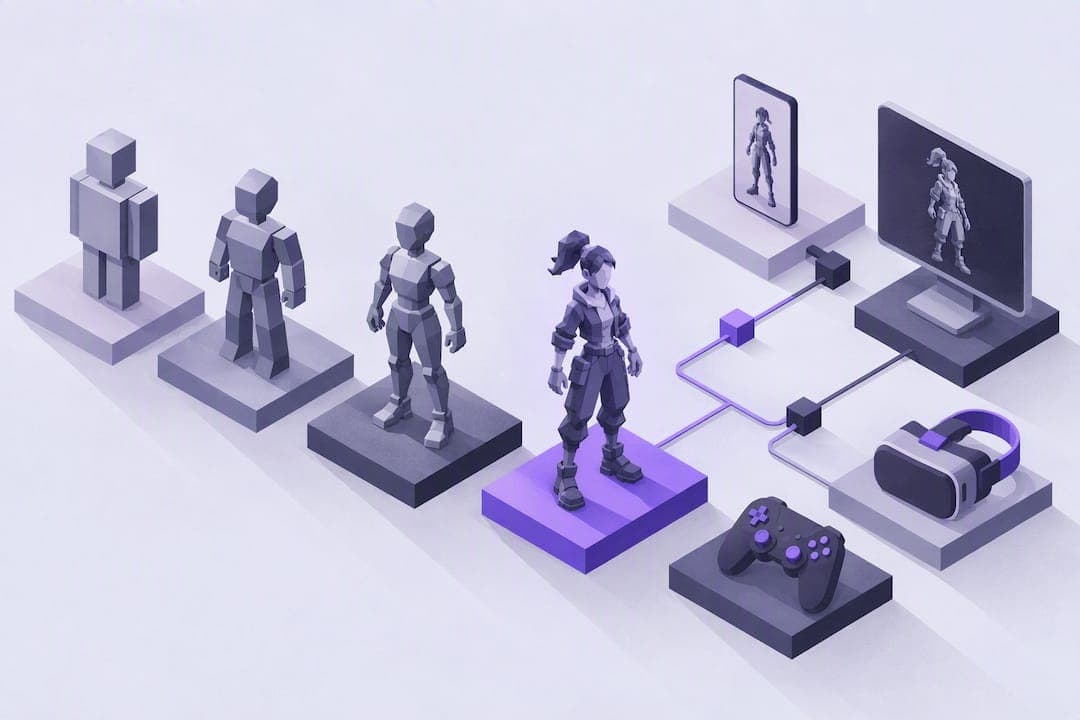
The clearest way to sort 3D character styles is realistic versus stylized, and almost everything else branches from that split. Inside those two camps sit the styles you'll actually use: high-poly realistic, semi-realistic, anime-inspired, cartoon/toon, low-poly, hand-painted, cel-shaded, and abstract or mixed. Which one fits your project depends less on taste and more on your platform, your budget, and who's going to look at the finished character.
TL;DR:
- Realistic characters require high polygon counts, PBR materials, and detailed sculpting, making them suited for AAA cinematic and hero shows.
- Stylized styles like cartoon and low-poly are optimized for performance, especially on mobile, and often use simpler shaders and topology.
- Choosing a style depends heavily on platform constraints, budget, audience, and animation complexity, with early prototyping preferred in low-poly for flexibility.
- Baking normal maps and high-resolution textures boosts realism but increases production time and memory, while stylized and low-poly styles favor speed.
- Rapid concept testing with stylized apps allows quick visualization of silhouettes and art direction, saving hours in initial development.
Table of Contents
- The Realistic vs. Stylized Split (And Why It Drives Everything Else)
- The Core Styles: What They Look Like and When to Use Them
- What Each Style Costs You in Production
- How to Choose the Right Style for Your Project
- Lessons From a Professional Character Pipeline
- Chasing Fidelity Isn't Always the Right Call
- Prototype Character Styles Without the Sculpting Marathon
- Sources
- FAQ
The Realistic vs. Stylized Split (And Why It Drives Everything Else)
Realistic character art aims for anatomical accuracy, physically plausible materials, and lighting that behaves like a camera captured it. Stylized art deliberately bends those rules for readability, charm, or speed. This split shapes 3D character art styles more than any single technique choice, because studio guides treat it as the organizing principle behind modeling, texturing, lighting, and rendering decisions across the entire pipeline.
The consequences show up fast once you start building:
- Realistic characters usually demand higher polygon counts, physically based rendering (PBR), and tools like ZBrush for sculpting detail and Substance 3D Painter for material work.
- Stylized characters can run leaner, often using non-photorealistic rendering (NPR), hand-tuned shaders, and simplified topology built in Maya or Blender.
- Ray tracing suits realistic film and cinematic work; real-time engines with baked lighting suit games and mobile apps.
A cinematic trailer character and a mobile game mascot might both be "3D characters," but they're solving completely different production problems.
The Core Styles: What They Look Like and When to Use Them
Once you know which side of the realism line you're on, the actual style choice narrows down to a handful of recognizable options. Here's how to tell them apart on sight, and when each one earns its place in a project.
- Realistic / high-poly. Dense topology, subsurface scattering on skin, pore-level texture detail, and PBR materials that respond correctly under any lighting setup. This is the domain of AAA cinematics, film VFX, and hero characters that get close-up camera time. Expect long sculpting sessions in ZBrush and heavier render budgets.
- Semi-realistic. Keeps believable proportions and lighting response but simplifies surface detail and softens exaggeration. Popular in mid-budget games and streaming animation where you want emotional believability without the render cost of full realism.
- Cartoon/toon. Built around animation principles like squash-and-stretch, oversized heads, and saturated color palettes rather than anatomical accuracy. Silhouette does most of the storytelling here, which is why toon characters read clearly even in busy scenes.
- Anime-inspired. Distinct eye treatment (oversized, high-contrast), simplified hair geometry, and often a custom NPR shader to flatten shading into anime-style bands of light and shadow. Growing fast in games and virtual production that want a distinctive look without full cel-shading.
- Low-poly. Deliberately visible facets instead of smooth curves, with triangle counts kept intentionally low to optimize performance. It's not a lesser version of high-poly work. It's an efficient aesthetic that suits mobile games, indie titles, and any project where a retro or geometric look is the point, not a compromise.
- Hand-painted textures. Lighting cues get painted directly into the diffuse map instead of calculated by a PBR shader. The tradeoff: gorgeous, cohesive art direction under fixed lighting, but less flexibility once you throw dynamic lights at it.
- Cel-shaded / toon-shaded. A shader-driven look, usually flat color bands with hard edge lines, achieved through custom shaders rather than baked textures. Works well in real-time engines because the shader does the heavy lifting rather than the texture artist.
- Abstract, experimental, or collage styles. Intentional rule-breaking, mixing geometric abstraction with representational elements. Portfolio platforms show these approaches showing up often in indie and art-driven projects where the goal is differentiation, not consistency with a genre norm.
Pro Tip: Pick your style before you finalize your rig. Cartoon and anime styles often need exaggerated bone stretching that a realistic rig setup won't support without rework.
What Each Style Costs You in Production
Every style choice comes with a technical bill, and it's worth knowing what you're signing up for before you commit a production schedule to it.
- Polygon and retopology: High-poly realistic sculpts get heavily retopologized down for animation; low-poly styles skip most of that step by designing lean from the start.
- Baking: Texture baking transfers detail from a high-resolution sculpt onto a lightweight mesh, which is standard practice for realistic and semi-realistic characters headed into games or real-time apps.
- Texture resolution: Realistic skin and cloth often need very high-resolution maps per material; stylized and low-poly characters frequently get away with lower-resolution maps without noticeable quality loss.
- Shaders: PBR suits realistic work, hand-painted maps suit stylized art under fixed lighting, and NPR shaders suit cel-shaded and anime looks in real-time engines.
Mobile platforms are the tightest constraint you'll hit. Draw calls, texture memory, and shader complexity all stack up fast, which is one reason low-poly and cel-shaded styles dominate mobile storefronts. A single high-poly hero character can carry significantly more texture memory than a level composed of multiple low-poly characters.
How to Choose the Right Style for Your Project
Work through these steps in order, and you'll land on a style that fits your constraints instead of just your inspiration board.
- Start with the platform. Mobile or web prototype points toward low-poly or cel-shaded. A AAA cinematic or trailer points toward realistic or high-poly.
- Check the budget and timeline. Small teams and fast deadlines favor stylized approaches with simpler shaders and lower texture demands.
- Consider the audience. Children's media and family games respond well to cartoon or hand-painted styles; mature or prestige projects often lean realistic or semi-realistic.
- Confirm animation complexity. Heavy squash-and-stretch rigs need stylized proportions from the start, not retrofitted later.
- Plan for reuse. If the character needs to scale across a game, a comic, and a storybook, a flexible stylized look adapts more easily than a hyper-realistic one.
The most common mismatch: teams pick a realistic style for narrative weight, then run out of budget for the retopology and baking it demands. Course-correct early by prototyping in low-poly first, then decide if the extra fidelity earns its cost.
Lessons From a Professional Character Pipeline
Studio-level workflows follow a consistent order, regardless of final style: gather reference, block primary shapes, sculpt, retopologize, lay out UVs, bake, texture, rig, then render.
- Blocking primary shapes first, before any detail work, cuts down on rework later because proportions and silhouette get locked in early.
- DynaMesh and Sculptris Pro speed up early sculpting since you're not managing topology yet.
- Clean retopology and organized UVs make baking predictable instead of a last-minute scramble.
Pro Tip: Bake when you need real-time performance with high-resolution detail. Skip baking and go hand-painted when your lighting is fixed and you want full art-directed control over the final look.
Chasing Fidelity Isn't Always the Right Call
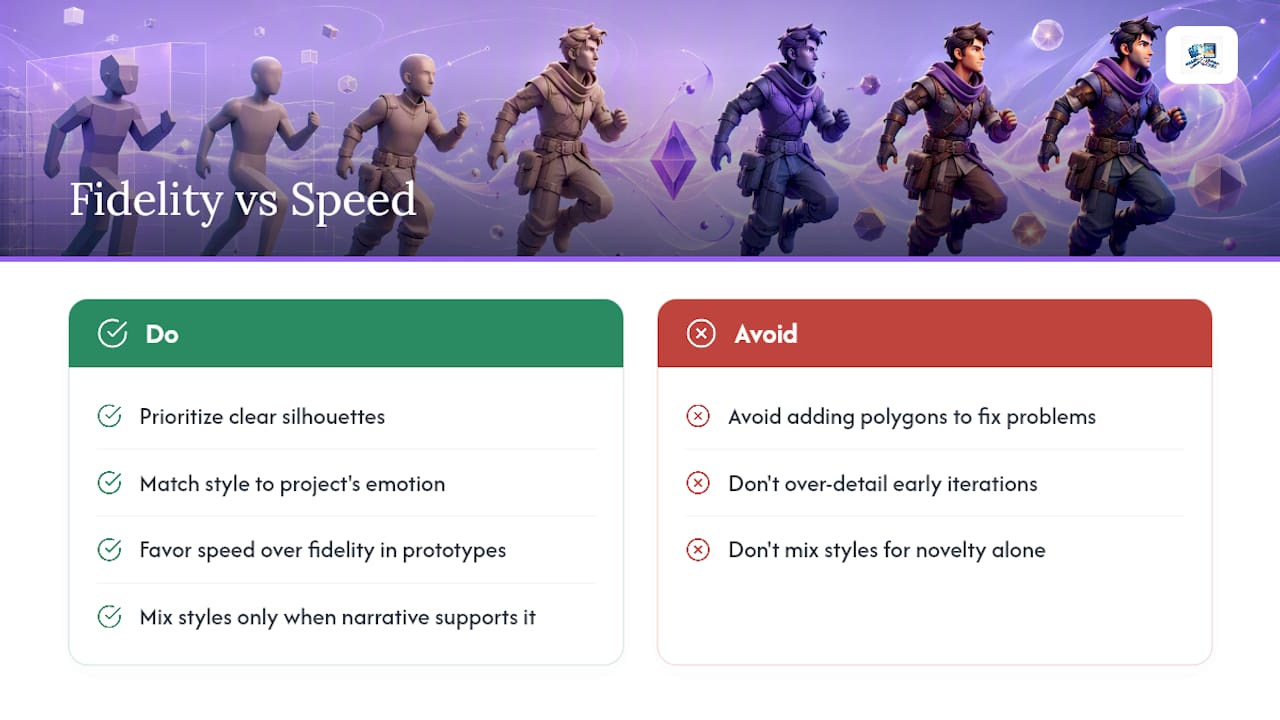
Most character problems aren't solved by adding more polygons. They're solved by clearer silhouettes and a style that matches the emotional register of the project. Speed over fidelity is usually the right trade for early prototypes and games with fast iteration cycles. Save extreme detail for hero shots that actually get camera time.
Mixing styles works, but only when there's a narrative reason behind it; mixing for novelty alone usually reads as indecision rather than intent.
— ADAM
Prototype Character Styles Without the Sculpting Marathon
Testing a style idea usually means hours in ZBrush before you know if it even works. A faster route is an app that lets you sketch a character by hand and turns it into a fully rendered 3D fantasy character in various styles such as comic book, manga, fairytale, or fable, without retopology or baking needed to see the concept take shape.
That speed matters most in two situations: early concept tests where you need to see a silhouette before committing production hours, and children's creative projects where a kid's drawing becomes a character and a storybook in one pass. Teachers and parents use it the same way a storyboard artist uses quick thumbnails, to get an idea in front of an audience fast, before locking anything into a full pipeline. If you want to see how a sketch turns into a stylized character, try the character app and run your own concept through it.
Sources
- Mastering low-poly character development
- Cartoony 3D animation tips & tricks
- Character Creation for Production | The Gnomon Workshop
- What is texture baking and why is it important?
- 3D Character Art Styles: Different Types & Guide In 2026
FAQ
What are the different types of 3D character art styles?
The main types are realistic/high-poly, semi-realistic, cartoon/toon, anime-inspired, low-poly, hand-painted, cel-shaded, and abstract or mixed styles. Each one carries different modeling, texturing, and rendering demands, so the realistic versus stylized split is the fastest way to sort them.
What is the 3D animation style called that uses flat, comic-like shading?
That's called cel-shading, or toon-shading, and it uses shaders rather than baked lighting to produce flat color bands with hard edges. It's common in real-time games because the shader handles the look instead of the texture artist.
What's the best 3D character style for games?
It depends on the platform: low-poly and cel-shaded styles suit mobile and indie games because they're lighter on memory and draw calls, while realistic or semi-realistic styles suit AAA titles with bigger render budgets. Cartoon and anime-inspired styles work well for games aiming at broad or younger audiences.
Can you mix multiple 3D character styles in one project?
Yes, and many indie and art-driven projects do this intentionally for narrative or branding reasons rather than by accident. Mixing works best with a clear creative reason behind it, not as a way to avoid committing to one look.
Does an app exist that supports different character styles?
Yes, the app renders sketches into styles including comic book, manga, fairytale, and fable, which makes it a fast way to prototype a stylized character before committing to a full production pipeline. Current pricing and access details are available on the Pens and Pencils site.